TradingView-style trading for NinjaTrader 8
Chart Trader Edge
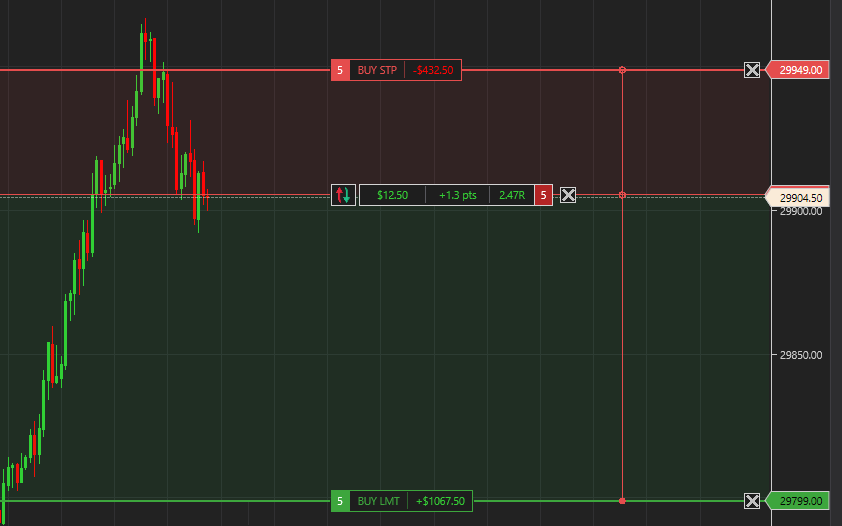
Trade from your NinjaTrader 8 chart the way TradingView traders are used to. See your risk, reward and risk:reward ratio in dollars and points on every entry, stop and target, drag orders on the chart, and plan brackets before you send them.
Coming from TradingView?
- Drag orders on the chart
- Position-tool style trade planning
- Risk and reward zones with a risk:reward ratio
- Dollars, points or ticks on every line
Features
- Multiple targets, each with its own size and dollar value
- Labels turn see-through when candles overlap
- Compact or detailed labels
- Preset color themes or your own colors
- 200+ settings, all optional, saved as profiles
Frequently asked questions
What is Chart Trader Edge?
A NinjaTrader 8 add-on that shows your entry, stop and target with dollars, points and risk:reward right on the chart, so you can plan and manage trades TradingView-style.
Can NinjaTrader 8 trade like TradingView?
NinjaTrader's built-in Chart Trader shows basic order lines. Chart Trader Edge adds the TradingView-style experience: drag orders on the chart, see risk and reward in dollars and points with a risk:reward ratio, and plan trades with a position-tool style planner.
Is there a TradingView long/short position tool for NinjaTrader?
The Chart Trader Edge trade planner works like one: set entry, stop and target on the chart, see the risk:reward ratio and dollar risk, then send it as a real bracket order.
What can I customize?
Nearly everything: which values each label shows, colors and line styles for every order type, label transparency, how dragging behaves, zone shading, the connector and more. Over 200 settings, saved as profiles you can switch between.
Are the zone shading and connector lines always on?
No. Every visual is optional. Turn on only what you want and keep the rest of your chart clean.
Does it work for long and short trades?
Yes. Longs and shorts, market and limit entries, stops and targets, and multiple targets with their own size.
Which instruments does it work with?
Any instrument you trade on a NinjaTrader 8 chart.
Does it replace NinjaTrader Chart Trader?
No. It works alongside NinjaTrader 8's Chart Trader and your existing orders.
What happens after I buy?
Everything is sent to your email, and support is available whenever you need help.